Aster connects Android to AI assistants like Claude, OpenClaw, or MoltBot via Model Context Protocol. The CoPilot for your mobile — or give your AI a dedicated device and let it call, text, and act on its own.
Find duplicate photos on my phone and free up space
Found 47 duplicate sets taking up 1.2 GB. Want me to keep the best quality version of each and delete the rest?
You gave your AI a voice.
Now give it hands.
Your AI assistant already reads, writes, and thinks for you. But it's been stuck behind a screen — unable to touch the one device that runs your life.
Your AI can talk
"Hey AI, set an alarm for 6 AM" — and then you pick up the phone yourself.
Your AI can act
"Hey AI, set an alarm for 6 AM" — and it just does it.
"You already trust AI with your emails, your calendar, your code.
Aster lets it touch your phone — or better yet, its own."
"Your flight to Delhi boards in 90 min. Leave now to make it."
Give your AI
its own phone.
Plug an old Android into a charger. Install Aster. Connect it to your AI. Now your assistant has its own number, its own device — and it can call you.
You gave it WhatsApp. You gave it Telegram. You gave it your email.
Now give it a phone. Let it call you back.
"Turn off my alarm and read me any urgent messages."
Your AI silences the alarm, scans notifications, and gives you a voice briefing — all before you open your eyes.
"My phone is somewhere in this room — make it vibrate."
Triggers a strong vibration pattern instantly. No need to find another phone to call yourself.
"Screenshot my boarding pass and save it to Downloads."
Opens your email, finds the pass, takes a screenshot, and files it — ready for offline access.
"What apps did my kid use today and for how long?"
Reads app usage stats and gives you a clear breakdown. No snooping apps needed.
"Find all photos with Mom from this year."
Searches by date, location, and content. Returns a curated gallery from your camera roll.
"Send me a photo of my dog every hour — I'm at work all day."
Your AI snaps a photo via the phone camera and forwards it to your WhatsApp. Your pup is safe, and you have the photos to prove it.
Your phone talks to your AI
before you even ask.
Aster pushes real-time events — SMS, notifications, device status — straight to your AI via webhooks. No polling, no delays. Your AI reacts the moment something happens.
Mom: "Running late, can you pick up groceries on the way?"
Airline app: Flight AI-302 delayed 45 min — new gate B12
Delivery app: Your package has been delivered to your doorstep
Samsung Galaxy S25 connected — Android 16, battery 87%
Works out of the box with OpenClaw, ClawdBot & MoltBot
Enable proactive event forwarding in one command. Your AI agent starts receiving real-time phone events via webhook — no extra setup, no plugins.
✓ Webhook connected — events will forward automatically
Or configure from the dashboard at /settings/openclaw
Check on your dog while you're at work
Set up a spare phone near your pet. Your AI takes photos on schedule and sends them to your WhatsApp. Your pup is safe, and you have the pics to prove it.
Record a clip when someone's at the door
Keep a spare phone near your entrance. When a doorbell notification fires, your AI records a short video and texts it to you.
Know the second your ride arrives
Your AI watches for ride-hailing notifications. "Driver is 2 mins away" — it speaks it aloud via TTS and texts you so you're ready.
Get called when your flight status changes
Gate change? Delay? Cancellation? Your AI monitors airline notifications and actually calls you to speak the update — no more missed gate announcements.
Keep an eye on the nursery
Keep a spare phone in the baby's room. Your AI takes periodic photos and forwards them to your WhatsApp. Peace of mind, one message away.
Auto-reply when you're busy or driving
In a meeting? Driving? Your AI reads incoming messages and sends context-aware replies — "In a meeting, will call you back in 30 min."
40+ tools. Your phone or theirs.
Screen control, file management, media intelligence, calls, SMS, and device automation — whether it's your CoPilot on mobile or your AI is running its own phone.
Screen Control
Capture screenshots, read the UI tree, tap, swipe, type, and navigate — all through natural language.
File Management
List, read, write, delete files. Analyze storage, find large files, and manage your device filesystem.
Media Intelligence
Search photos with natural language — "trip to Mumbai last month" or "sunset photos near the beach".
Notifications & SMS
Read notifications in real-time, access SMS threads, or let your AI monitor its own phone and alert you when something matters.
Shell Execution
Run shell commands within the app sandbox. Launch intents, manage packages, and automate workflows.
Audio & Haptics
Text-to-speech, audio playback, custom vibration patterns, toast messages, and overlay displays.
Location & Battery
GPS coordinates, geocoding, battery health and charge level — all accessible to your AI assistant.
Calls, SMS & Voice
Make calls, send SMS, or use make_call_with_voice to dial someone and speak a message via TTS on speakerphone — fully autonomous.
Proactive Events
Your AI doesn't just wait for commands — it reacts to incoming SMS, notifications, and device events in real-time via webhooks.
Camera & Video
Take photos or record video remotely. Pet cam, home security, package delivery — your AI's eyes are always on.
Companion apps included
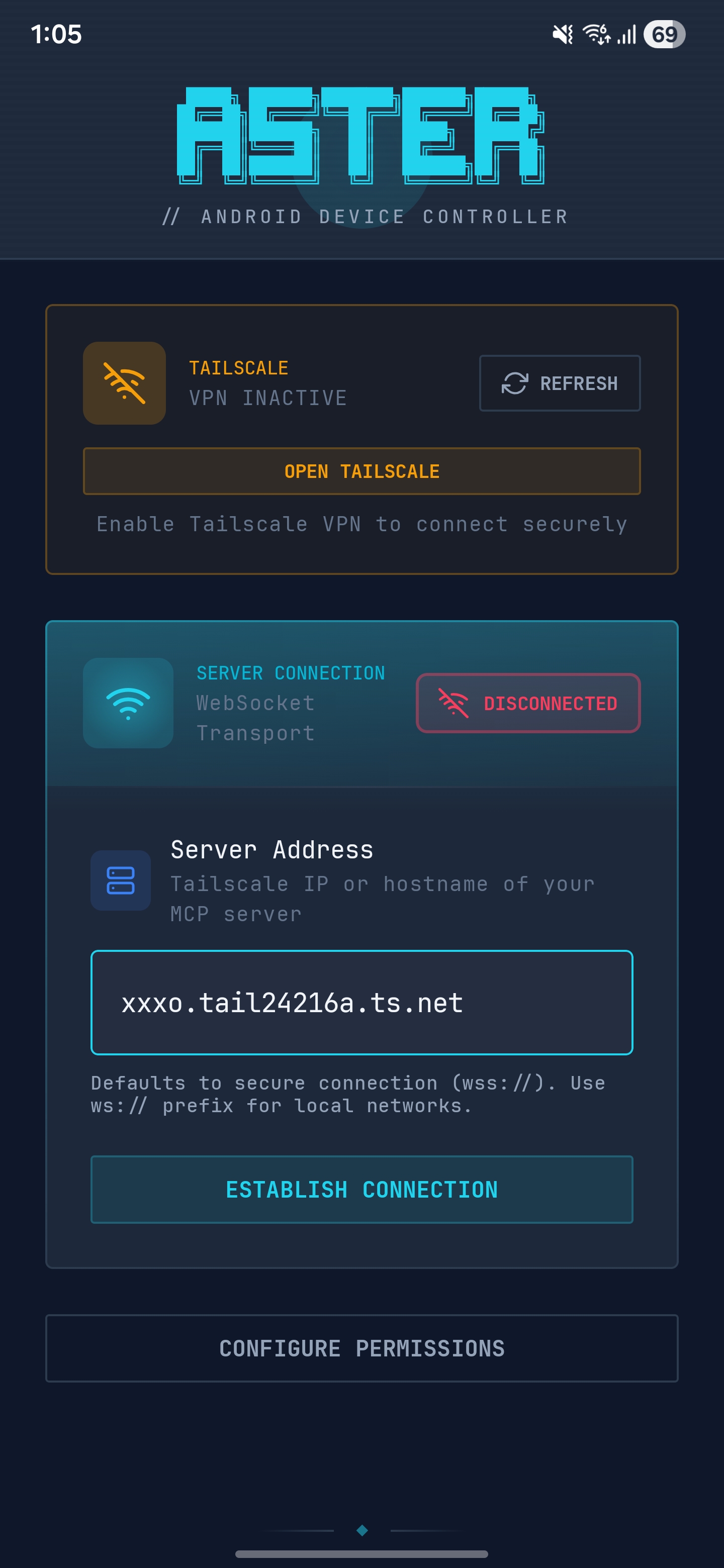
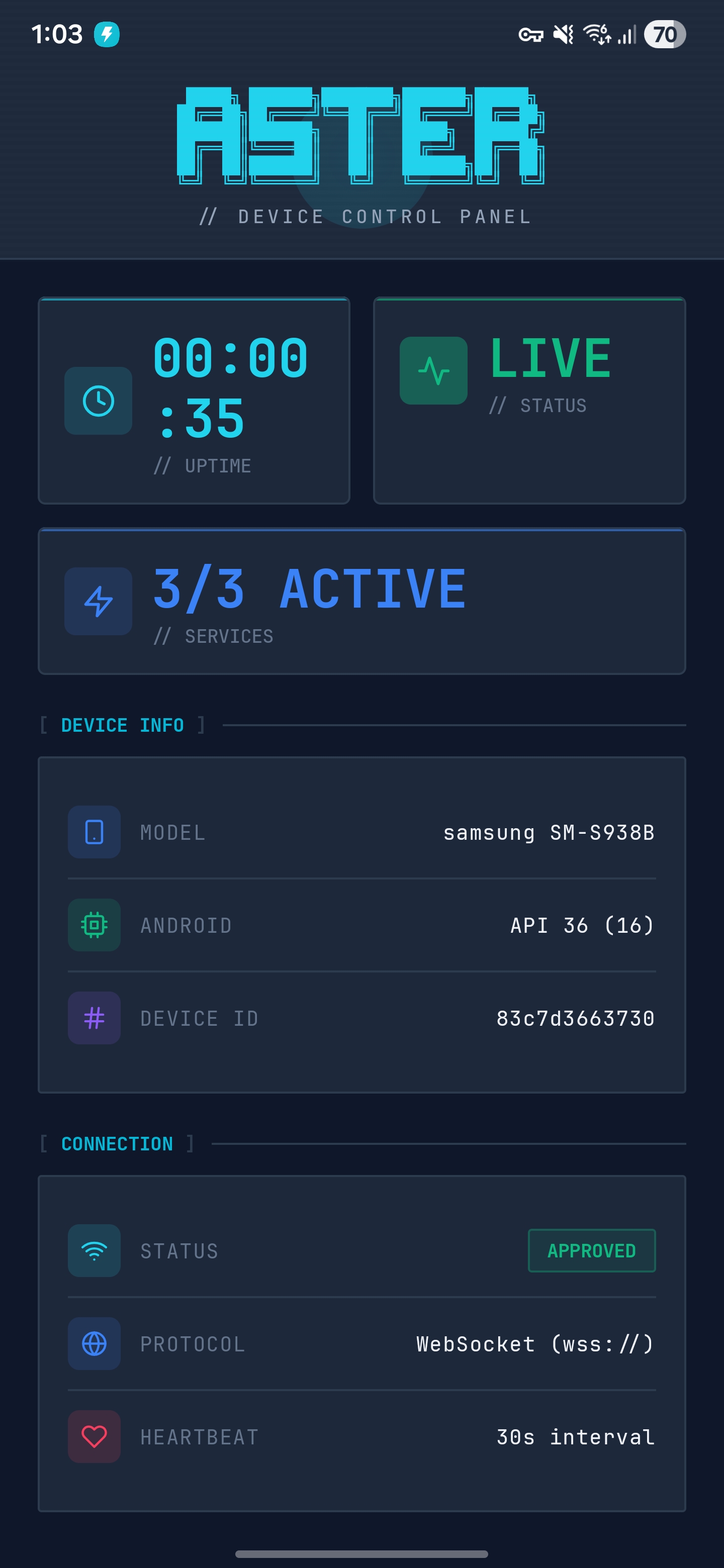
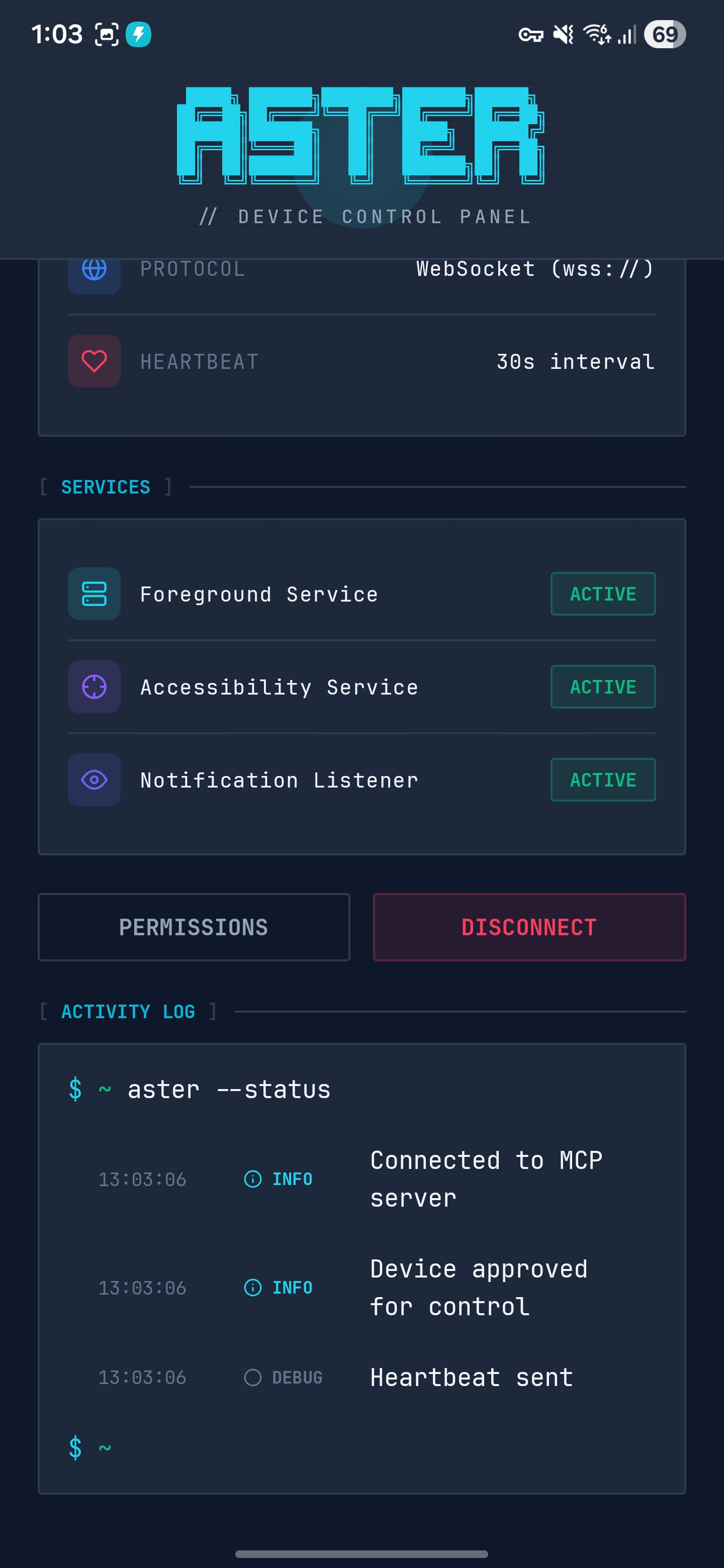
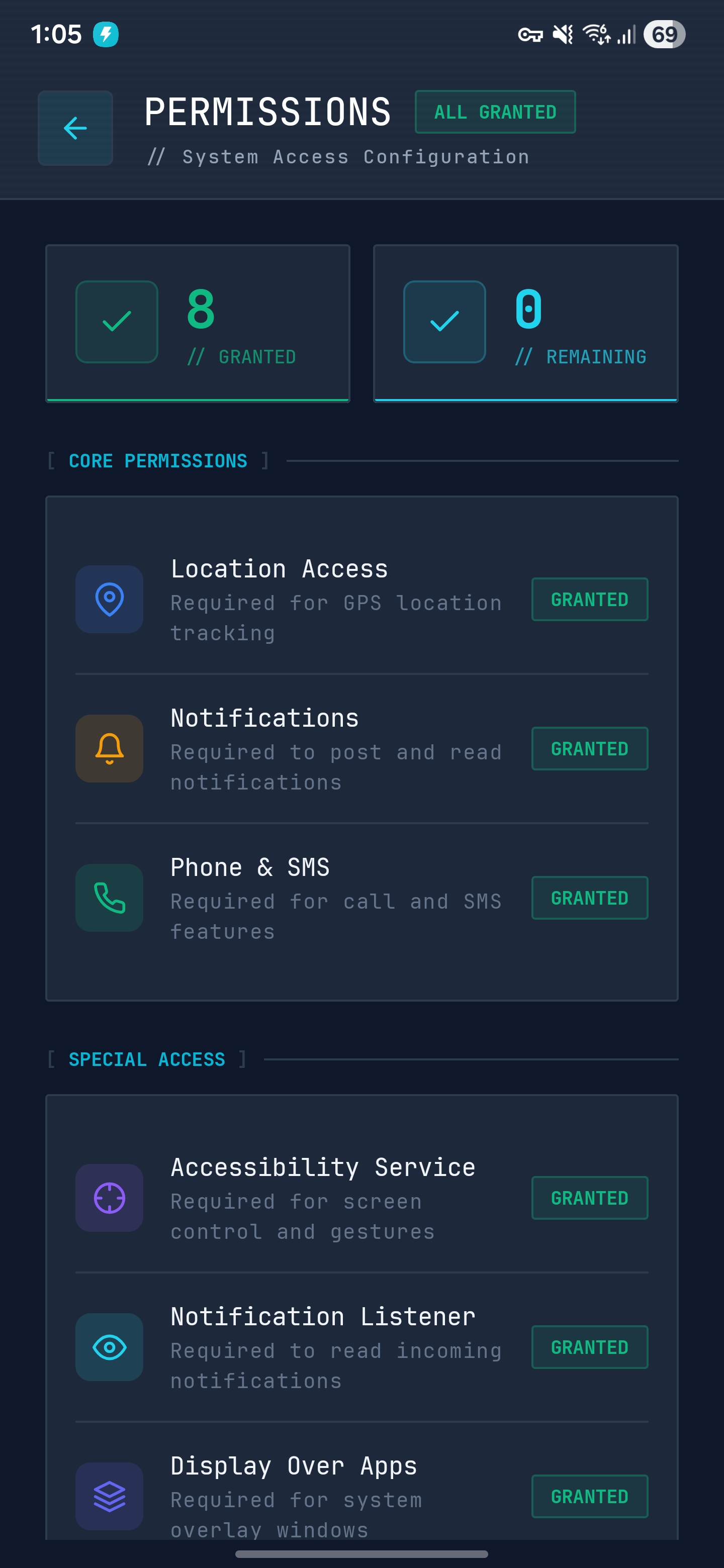
Aster ships with an Android companion app and a web dashboard for device management, file browsing, and MCP tool testing.
Things you'll actually say — and things your AI will
Forget technical jargon. Talk to your AI like a human, or let it act on its own device — Aster handles the rest.
"Find all duplicate photos on my phone and show me which ones to delete"
Scanning media library... Found 47 duplicate sets across 2,104 photos. I can show you side-by-side comparisons.
"Show me photos I took in Goa last December"
Found 83 photos from Dec 2024 geotagged near Goa. Includes 12 beach shots and 6 sunset panoramas.
"Find screenshots I took this week and delete the blurry ones"
Found 23 screenshots from this week. 5 appear blurry or unreadable — ready to delete on your say.
"Ring my phone at 10 AM tomorrow for the standup meeting"
Done! I'll play a ringtone and show a notification at 10:00 AM — "Standup Meeting".
"Vibrate my phone three times — I can't find it under the couch"
Vibrating now with a strong 3-pulse pattern. Keep listening!
"Read my unread notifications and tell me if anything is urgent"
14 notifications: 2 from Slack (marked urgent), 1 missed call from Mom, rest are promotions.
"Copy the meeting-notes.pdf from my phone to my Mac"
Found meeting-notes.pdf in Downloads (2.3 MB). Reading file and ready to transfer.
"My phone is running low on storage — find what's eating up space"
Storage breakdown: WhatsApp media 8.2 GB, cached data 3.1 GB, old APKs 1.4 GB. Want me to clean up?
"Delete all downloaded PDFs older than 6 months"
Found 34 PDFs older than 6 months in Downloads (890 MB total). Shall I delete them all?
"Call Mom and tell her I'll be 20 minutes late"
Calling Mom now. Speakerphone on — I'll speak your message once she picks up.
"Read my last SMS from the delivery guy and reply "Thanks, I'll be home""
Last SMS: "Your package will arrive between 2-4 PM." Sending reply now...
"Show "Do Not Disturb — In a Meeting" on my phone screen"
Displaying overlay on your device. It'll stay visible until you dismiss it.
"Take a screenshot of my screen and tell me what app is open"
You have YouTube open, playing "Lo-fi Beats to Study To". Battery at 62%, Wi-Fi connected.
"What's my battery at? Should I charge before heading out?"
34% with about 2 hours left. You should charge before leaving — it won't last a full evening.
"Open Google Maps and search for the nearest coffee shop"
Launching Google Maps... Searching "coffee shop near me".
"Left my dog home alone — take a photo every 30 mins and send it to me on WhatsApp"
Pet cam mode active. I'll snap a photo on schedule and forward it to your WhatsApp. Your pup is safe with me.
"When I get a message while driving, auto-reply that I'm on the road and will call back"
Got SMS from Alex: "Are you free?" Replied: "Driving right now, will call you back in 20 min."
"If my food delivery app says the rider is nearby, announce it on speakerphone"
Delivery notification detected — "Your rider is 1 min away." Announcing via TTS now. Go grab it!
"Call me if my flight gets delayed — and tell me the new time"
Monitoring airline notifications. Flight AI-302 delayed 45 mins — calling you now to let you know.
"If someone rings the doorbell, record a 5-second clip and send it to me"
Doorbell notification detected. Recording 5s video... Done. Sending clip to your WhatsApp now.
"Keep the phone in the baby's room — if it picks up crying sounds, text me immediately"
Audio monitoring active. Detected unusual noise — taking a photo and texting you with status. Everything looks calm.
Like texting a super-powered assistant
Watch a real conversation unfold. Every message triggers actual tools on the Android device — yours or the AI's own.
Your data never leaves your network
Aster is fully self-hosted. No cloud, no telemetry, no third-party relay — whether it's your CoPilot on mobile or a dedicated AI device.
Self-Hosted
Runs entirely on your machine. No cloud dependency, no data leaves your network.
Zero Telemetry
No analytics, no tracking, no usage data collection. What you do stays with you.
Device Approval
Every new device must be manually approved from your dashboard before connecting.
Private & Tailscale Ready
The MCP server runs on your machine. For remote access, Aster auto-detects Tailscale and routes traffic over an encrypted WireGuard mesh — zero config, no port forwarding.
No Root Required
Uses the official Android Accessibility Service API — the same system powering screen readers. No rooting, no ADB hacks, no exploits. Every action is permission-gated and sandboxed.
MIT licensed. Read every line, audit every tool, fork and modify freely.
Watch a command propagate
From natural language to hardware execution — trace a command across AI, server, and device. Works the same whether it's your CoPilot on mobile or AI running its own phone.
"Take a screenshot of my phone"
AI Assistant
MCP ClientAster Server
Node.js · WS BridgeAndroid Device
Kotlin · AccessibilityAI Assistant
MCP ClientAster Server
Node.js · WS BridgeAndroid Device
Kotlin · AccessibilityUp and running in minutes
Four steps to connect any Android device — your daily phone or a spare one dedicated to your AI.
Install & start the MCP server
Install the aster-mcp package from npm globally and start the server. It launches a WebSocket on port 5987 and an MCP HTTP endpoint on port 5988.
$ npm install -g aster-mcp
$ aster start

# Server running:
#   WebSocket  → ws://192.168.1.x:5987
#   MCP HTTP   → http://localhost:5988/mcp
# Dashboard → http://localhost:5989Install the Android companion app
Download the latest APK from GitHub Releases or build from source. Grant Accessibility Service permission when prompted.
# Required permissions:
✓ Accessibility Service  — UI automation
✓ Notification Access   — read notifications
✓ Location              — GPS & geocoding
✓ Storage               — file management
✓ SMS & Phone — messages & callsConnect device to server
Open the Aster app, enter your server's WebSocket URL, and tap Connect. Approve the device from the web dashboard. Works with your daily phone or a spare Android plugged into a charger as your AI's dedicated device.
Configure your AI client
Add the Aster MCP endpoint to Claude Desktop, Claude Code, or any MCP-compatible client.
{
  "mcpServers": {
    "aster": {
      "type": "http",
      "url": "http://localhost:5988/mcp"
    }
  }
}Works with your favorite AI clients
Aster is compatible with any MCP client. Give Claude, OpenClaw, MoltBot, or ClawBot a CoPilot for your phone — or let them own one.
Claude
Claude Desktop & Claude Code via MCP
OpenClaw
Install as a ClawHub skill
MoltBot
Add via ClawHub or direct skill link
ClawBot
Compatible via MCP or ClawHub skill
Install via ClawHub
Available as a skill on ClawHub for OpenClaw, MoltBot, and ClawBot.
$ clawhub install asterInstall via direct link
Install the skill directly from the GitHub repository raw link for any compatible client.
# Raw skill link:
https://raw.githubusercontent.com/satyajiit/Aster/main/skill/SKILL.mdnpm install -g aster-mcp40+ tools at your AI's fingertips
Every tool is exposed via the Model Context Protocol — compatible with Claude, OpenClaw, and any MCP client.
Screen & Input
Navigation & System
Files & Storage
Media & Search
Communication
Device Sensors
Follow the Author
Aster is built by Satyajit Pradhan. Follow @GamesPatch on YouTube for tutorials, demos, and updates.
Subscribe to @GamesPatch